
How do I unsubscribe?
TABLE OF CONTENTS
Subscribed via Mexta?
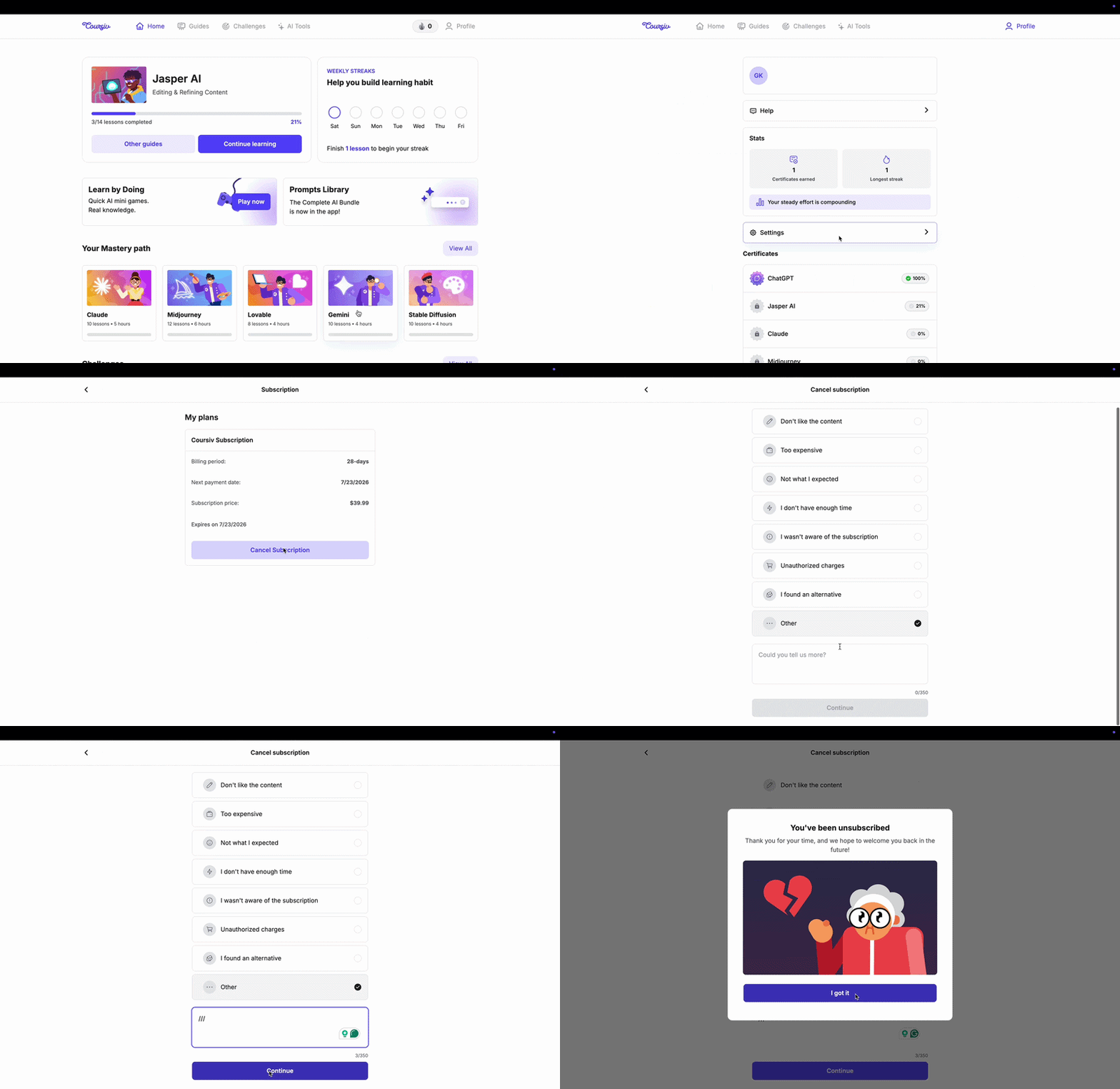
- Log in to your Mexta account
- Go to Profile → Settings → Subscription
- Click Cancel Subscription
Using the iPhone but subscribed via the website?
Your subscription won't appear in Apple's settings — manage it directly through Profile → Settings → Subscription on mextalearn.com
Subscribed via Android app?
- Open the Google Play Store
- Tap your profile picture in the top right corner
- Tap Payments & subscriptions → Subscriptions
- Find Mexta and tap Cancel subscription
For more details: Google Play Cancel Subscription
Subscribed via App Store?
- Go to iPhone Settings
- Tap your name at the top
- Tap Subscriptions
- Find Mexta and tap Cancel Subscription
For more details: App Store Cancel Subscription
Don't see Mexta in your Apple subscriptions?
This means you subscribed through the Mexta website, not the App Store. Go back and follow the Subscribed via Mexta website instructions above.
After cancellation: You'll receive a confirmation email. Your access remains active until the end of the current billing period — you won't be charged again.
Questions? Contact us at support@mextalearn.com.
Still need help?
Our team replies at support@mextalearn.com